

Choose Sithealthier if you need ergonomic seating for dental, medical, or chairside work; choose Best Buy if your main project is equipping a technology-focused home office and comparing seating alongside electronics. This 2026 comparison separates clinical seating requirements from general office shopping so you can choose the retailer that matches your task.
- Sithealthier vs Best Buy: choose the seating specialist for clinical seating and Best Buy for technology-focused office shopping.
- Dental stools and surgeon chairs require task-specific checks for seat shape, support placement, and workspace clearance.
- Neither retailer wins on fit without checking the exact chair and configuration.
- Compare the complete seating configuration, not retailer names or ergonomic labels alone.
Why this matters
A dental hygienist approaching a patient needs a different seating assessment from someone buying a chair for email and video calls. Seat shape, support placement, and room clearance belong at the beginning of the clinical purchase, not after you have chosen a retailer.
Sithealthier is the better starting point for dental and medical professionals comparing ergonomic seating by clinical task. Its catalog includes saddle chairs, surgeon chairs, medical stools, and dental assistant seating, alongside conventional office chairs.
Best Buy's broader identity is consumer electronics retail. That makes it a relevant starting point when computers, monitors, and other technology define your office project, but it does not establish whether any particular chair fits clinical work.
For a 2026 purchase, compare the actual configuration you intend to order. A familiar retailer name does not answer questions about seat width, support adjustment, or cleaning compatibility.
At a glance
| Dimension | Sithealthier | Best Buy |
|---|---|---|
| Best for | Dental, medical, and office buyers comparing specialized ergonomic seating | Buyers organizing a technology-focused home office |
| Standout feature | Seating categories covering saddle, surgeon, medical, and dental tasks | Electronics-focused shopping context |
| Clinical task selection | Catalog includes surgeon chairs and dental assistant stools | Evaluate any candidate chair against the clinical task individually |
| Technology-first office projects | Seating and related ergonomic workspace products | Better starting point when electronics drive the purchase |
| Fit and adjustment | Compare the exact model, seat configuration, and controls | Compare the exact model, seat configuration, and controls |
| Cleaning and purchase terms | Confirm product documentation and order-specific terms | Confirm product documentation and order-specific terms |
| Pricing model | Individual product purchases; configuration defines the comparison | Individual product purchases; configuration defines the comparison |
The seating specialist wins for clinical task selection
Start with what your hands, feet, and upper body must do during the procedure. A stool for moving around an examination room and a chair for supported precision work should not enter the same shortlist simply because both carry an ergonomic label.
The Ergonomic Surgeon Chair with FootRest for Precision Surgical and Dental Work is a catalog example of seating identified for surgical and dental tasks. Its title identifies a footrest; assess the remaining configuration against your procedure before selecting it.
Other catalog examples illustrate different support arrangements:
- Best for evaluating static upper-limb support: Salli Surgeon or Expert Twin Medical Chair or Tool. Its description identifies a static upper-limb support system.
- Best for evaluating integrated support: Nightingale Chair - Surgeon Console Stool; 1864. Its description identifies an integrated back and arm.
- Best for evaluating an assistant-style layout: Saddle Style Dental Assistant Stool with Swing Arm and Footrest. Its title identifies the swing arm and footrest.
These are task-based starting points, not interchangeable recommendations. A support that suits a console position needs a separate clearance assessment beside a patient chair.
The specialist catalog wins on clinical relevance; the trade-off is more configuration work before you choose. Do not treat the presence of a clinical product name as proof of procedural suitability.
Best Buy wins when electronics define the project
Choose Best Buy as your starting point when your central decision is the computer, monitor, or other electronics around which you are building an office. Its consumer-electronics focus matches that shopping brief more directly than a seating-led catalog.
This is a genuine advantage for the home-office buyer whose chair is part of a broader technology project. You can organize the purchase around the equipment you need rather than begin with specialized clinical seating categories.
The limitation is straightforward: electronics relevance does not establish chair fit. A monitor comparison tells you nothing about whether a seat adjusts to your working height or leaves room beneath your desk.
For a technology-first office, establish these requirements before evaluating a chair:
- The working position of your keyboard and pointing device.
- The space beneath the desk for your legs and chair supports.
- Whether you need a conventional task chair or want to assess a saddle seat.
- Whether arm supports obstruct your approach to the work surface.
Best Buy wins the electronics-led shopping brief, not an automatic ergonomic seating contest. Keep those decisions separate throughout your 2026 office setup.
Specialized seating offers clearer clinical configuration choices
A saddle seat is a category, not a single configuration. The supplied catalog includes adjustable-width designs, narrower seats, backrests, footrings, and upper-limb supports, giving clinical buyers distinct features to assess.
For example, Salli MultiAdjuster Saddle Chair with Adjustable Seat Width explicitly identifies width adjustment. Salli SwingFit Ergonomic Saddle Chair or Stool describes a mechanism that lets the seat tilt in different directions without a separate adjustment lever. Width adjustment and seat movement answer different needs; do not substitute one for the other.
Use concrete specifications to make the distinction:
- Seat size: Narrower Seat 360° Dynamic Motion Ergonomic Saddle Stool Holland Made describes a 13-inch seat. Compare that dimension with your seated fit rather than assuming that narrower is better.
- Load requirement: Heavy-Duty Split-Seat Saddle Stool, 500 lb Capacity identifies a 500 lb capacity. Capacity is a selection constraint, not evidence of comfort.
- Support movement: Ergonomic Dental Medical Stool with 360 Degree Rotation Armrest & Footrest identifies 360-degree armrest rotation. Check where the support sits during your actual task, not just how far it rotates.
These specifications are not comparable scores. Each answers a different question about the user, the task, or the workspace.
The advantage of a specialized selection is access to these distinct configurations. The disadvantage is that a longer feature list requires closer attention: more movement or support is not automatically a better fit.
Best Buy is the simpler starting point for a nonclinical brief
If you are furnishing a home office rather than an operatory, begin with the requirements of desk work. You do not need to evaluate surgeon supports or assistant-stool layouts unless your work specifically calls for them.
Best Buy is the more direct starting point when your brief remains centered on consumer technology and general office equipment. That recommendation concerns the shopping task, not a claim that its chairs outperform specialized alternatives.
A seating specialist becomes more relevant when the chair itself is the difficult purchase. Examples include deciding between a saddle and conventional seat, assessing an adjustable-width design, or comparing a backrest with an open-backed stool.
Choose the general electronics retailer for an electronics-led project; choose a seating-led search when seat configuration is the unresolved problem. Neither approach removes the need to assess the exact chair.
Home-office buyers should also avoid importing clinical features without a reason. An upper-limb support intended for a particular working position is not automatically useful for typing, and a taller stool needs a compatible work surface and foot-support arrangement.
Neither retailer wins on fit without a workspace check
Your chair must fit both your body and the place where you work. That remains true whether you buy a conventional office chair, a split saddle, or a surgeon-style seat.
For your 2026 shortlist, use the same assessment for every candidate:
- Task position: Reproduce the position used for treatment, scanning, charting, or typing.
- Seat fit: Check the seat shape and width without assuming that a product category guarantees comfort.
- Foot support: Confirm how you will support your feet at the working height.
- Support clearance: Check whether the backrest or arm support blocks your approach.
- Control access: Confirm that you can reach and operate the relevant adjustments.
The sequence matters. Set up the task first, then assess whether the chair supports it; do not rearrange a clinical task simply to accommodate an unsuitable seat.
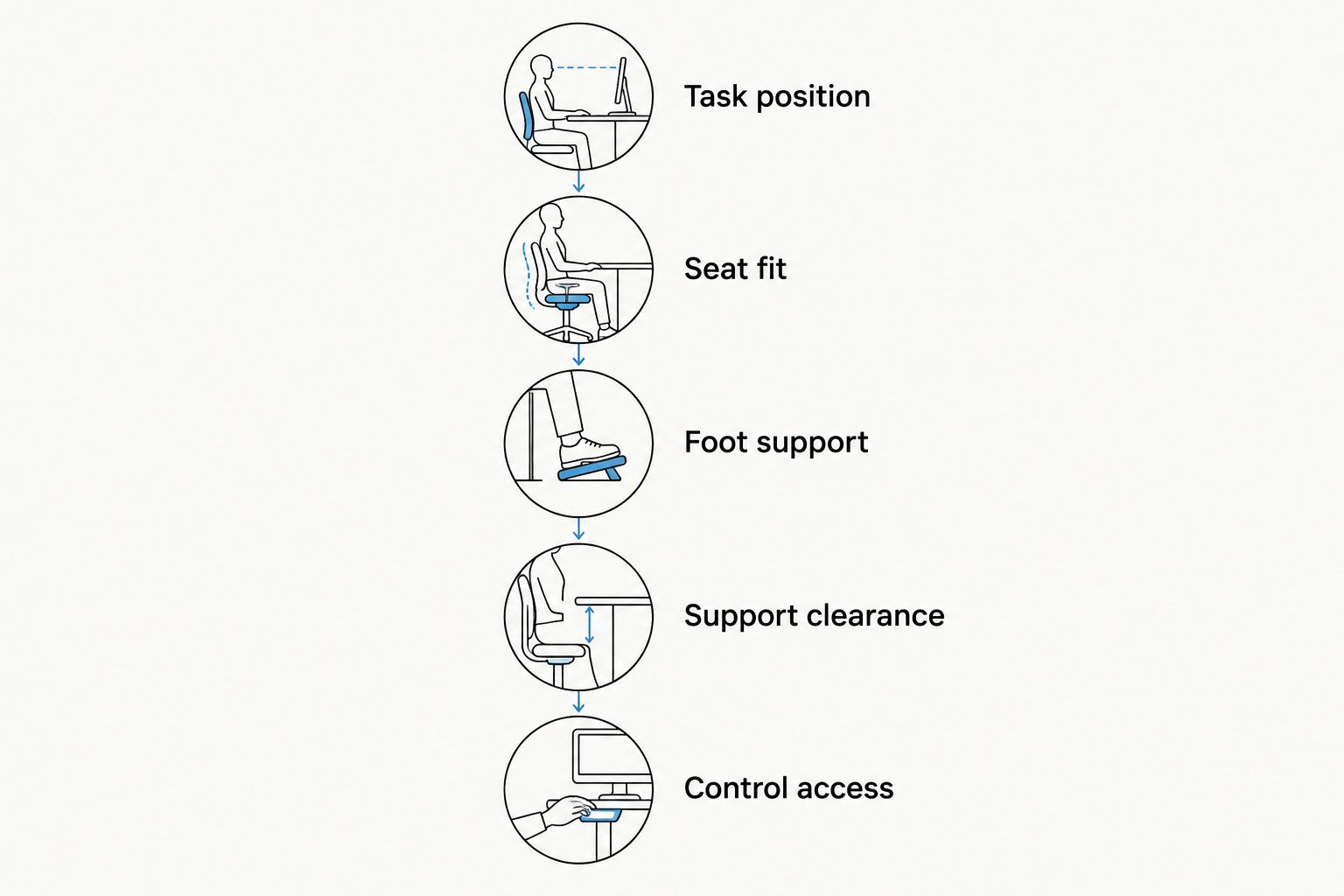
A chair that passes a desk-based check still needs a separate assessment at the patient chair or examination surface. Support placement and clearance change with the task.
Fit is a tie at retailer level: the exact model and configuration decide the result. Neither a specialist label nor a familiar store name replaces that assessment.
Cleaning documents and purchase terms are another tie
For clinical seating, ask for care instructions for the exact upholstery and configuration. A wipeable surface description alone does not establish compatibility with your clinic's cleaning products or procedures.
Before a 2026 clinical purchase, obtain answers to practical questions:
- Which cleaning agents and methods does the manufacturer permit?
- Are there separate instructions for upholstery, controls, and supports?
- What assembly does the selected configuration require?
- What return conditions apply to that exact order?
- Who handles a warranty request for the selected product?
Do not assume either retailer has the better policy without comparing the applicable terms. Product documentation and purchase conditions are separate from ergonomic fit, and both need approval before ordering.
This is particularly important when an organization buys seating for several users. A suitable configuration for one clinician does not establish suitability for every person sharing the room.
Pricing: compare complete configurations, not retailer labels
Both shopping routes involve choosing individual products. For a meaningful comparison, define the complete seating configuration first, including the supports and accessories you actually require.
A backless saddle stool and a chair with a backrest, footrest, and upper-limb supports are not equivalent purchases. Comparing them as if they solve the same task hides the decision that matters.
Use a configuration checklist rather than a retailer-wide affordability claim:
- Seat type and adjustment requirements.
- Required back, arm, or foot supports.
- Suitable cylinder or working-height configuration.
- Appropriate wheels or glides for the intended floor.
- Any assembly or installation requirements stated for the order.
Neither retailer earns a pricing win without an equivalent product comparison. For 2026 purchasing, check current transaction details directly and keep optional features separate from required ones.
Final verdict: choose by the problem you need to solve
Choose Sithealthier if you buy seating for clinical work
Named profile: the dental or medical professional selecting task-specific seating. Start here when you need to compare surgeon chairs, saddle stools, assistant seating, or clinical support arrangements. The seating categories align with that decision, but your final choice still requires specification and workspace checks.
Choose Best Buy if you are equipping a technology-first office
Named profile: the home-office buyer whose main purchase is electronics. Start here when computers and related equipment define the project, then evaluate any chair independently. This route is less directly aligned with a specialized clinical seating search.
| Dimension | Winner |
|---|---|
| Clinical task selection | Sithealthier |
| Electronics-led shopping | Best Buy |
| Specialized seating configurations | Specialist seating catalog |
| Nonclinical, technology-first brief | Best Buy |
| Individual fit | Tie: exact configuration decides |
| Cleaning documents and purchase terms | Tie: compare applicable documentation |
| Pricing | No winner without equivalent configurations |
FAQ
Is Sithealthier better than Best Buy for dental stools?
Sithealthier is the better starting point for comparing dental seating by task because its catalog includes saddle stools, dental assistant seating, and surgeon chairs. Confirm the exact configuration, cleaning instructions, and operatory clearance before choosing.
Which retailer should I choose for a home-office setup?
Choose Best Buy when electronics define your home-office project. Use a seating-focused search when the unresolved decision is seat shape, adjustment, or specialized support.
Does an ergonomic chair guarantee better posture or pain relief?
No ergonomic label guarantees a health outcome. Assess fit, adjustment, and task compatibility rather than treating a chair as a treatment for pain or a medical condition.
Is a split saddle seat better than a conventional office chair?
A split saddle seat is not automatically better than a conventional office chair. Compare how each design fits your body, working height, and actual clinical or desk task.
How do I compare the cost of chairs at these retailers?
Compare complete configurations that meet the same requirements. Keep required supports, seat adjustments, and floor-contact options consistent, then check current transaction details directly.
What should I check before buying a surgeon chair?
Check the working position, seat fit, foot support, support clearance, and control access. Also obtain the cleaning documentation and purchase terms for the exact configuration.
One last thing
More support is useful only when it remains useful during the task. Before approving a chair, trace the path your elbows, knees, and feet take as you approach the work and change position. Reject a configuration that obstructs that path, even when its feature list looks more complete.
Leave a comment