

An ergonomic home office chair is worth the extra cost in 2026 when its adjustments solve a specific fit or task problem that your current chair cannot. Extra spending is not justified by an ergonomic label alone, and a better chair does not replace a workable desk layout, changes of position, or medical care for persistent symptoms.
- Is an ergonomic home office chair worth it? Yes, when usable adjustments improve your actual workstation fit.
- Sithealthier offers ergonomic office chairs and clinical seating; choose by task rather than appearance.
- Compare seat fit, back support, arm clearance, and desk compatibility before selecting a chair.
- A saddle stool and a surgeon chair serve different tasks; neither automatically replaces a conventional desk chair.
Why this matters
Dental and medical professionals often need seating for two different settings: clinical work and home-office administration. A chair that suits patient access does not automatically suit charting, reading, or keyboard work at home. Start with the task, not the professional label.
For your 2026 purchase, compare Sithealthier ergonomic office chairs and clinical seating against the workspace you actually use. The useful question is not whether a chair has more features, but whether those features let you work without accommodating the chair.
Is an ergonomic home office chair worth the extra cost in 2026?
Yes, if the additional adjustment addresses an identifiable mismatch between your body, chair, and work surface. Keep your current chair if it already provides usable support and lets you reach your work comfortably. Replace it when adjustment cannot resolve the mismatch.
| Seating option | Best for | Useful advantage | Main limitation |
|---|---|---|---|
| Your current chair | A workstation that already fits | Avoids replacing seating that still meets your needs | Cannot solve a fit problem outside its adjustment range |
| Adjustable office chair | Keyboard work, charting, reading, and home administration | Lets you evaluate seat, back, and arm support together | Added controls only help when their ranges suit you |
| Saddle chair or stool | Tasks where saddle seating suits your working position | Provides an alternative seat shape and leg position | Requires its own desk-height and fit assessment |
| Surgeon or operator chair | Clinical tasks requiring a task-specific seating arrangement | Offers configurations intended for professional work | Clinical features do not establish suitability for home computer work |
The value comes from a usable change. If your existing seat is too deep, another chair with the same seat depth does not fix the problem simply because it adds a headrest. If armrests prevent you from approaching the keyboard, a different backrest alone does not resolve that obstruction.
Before comparing models, finish this sentence: I need the replacement chair to let me do something my current chair cannot. Name that change precisely. Examples include reaching the keyboard without armrest interference, obtaining usable back support, or matching a raised work surface.
An adjustable office chair: best for desk-based work
For home charting, reports, scheduling, and general computer work, begin by assessing a conventional office chair. Evaluate the seat, backrest, armrests, and controls as a system. Do not treat a long feature list as proof of fit.
Check whether you can sit back while keeping your feet supported and your keyboard within comfortable reach. Your shoulders should not need to lift to reach the work surface. Armrests should support your preferred position without stopping the chair from approaching the desk.
The trade-off is that adjustment takes attention. A control adds value only if you understand what it changes and can use its full relevant range. A headrest, for example, should not outrank basic seat fit when your main task is typing.
Choose an adjustable office chair for home-office work when its documented dimensions and controls address your specific mismatch. Do not choose it solely because it looks more substantial than your current seat.
A saddle chair: best for a deliberately matched workstation
A saddle chair deserves consideration when you specifically want saddle seating and can match the work surface to that position. It is not a universal upgrade from an office chair. Seat shape, width, height, and any tilt mechanism need separate checks.
Product descriptions illustrate why dimensions matter. The Narrower Seat 360° Dynamic Motion Ergonomic Saddle Stool Holland Made specifies a 13-inch seat. The Small Ergonomic Saddle Seat Stool for Petite Women describes its intended users as approximately 5 feet 2 inches or shorter and 125 lb or less. Those details describe those products, not universal rules for saddle seating.
For a saddle stool, check your leg position and desk clearance together. Do not assume that a compact-looking seat will work under a low desk. Equally, do not assume that every split seat provides adjustable width.
The limitation is the change in seating arrangement. A saddle stool does not necessarily provide the back or arm support you use during desk work. Choose saddle seating because its verified configuration matches your task, not because the category promises a health outcome.
A surgeon chair: best for a defined clinical task
A surgeon chair belongs on your shortlist when the task requires a clinical seating arrangement. For a dentist or medical professional buying primarily for home administration, the professional title alone is not a reason to select it. Compare the actual supports and working position.
The following examples show different documented features, not an overall ranking or a statement of suitability for every user. For a 2026 decision, confirm the complete dimensions, adjustment ranges, and configuration before selecting either model.
| Model | Best for evaluating | Documented feature | Trade-off to check |
|---|---|---|---|
| Salli MultiAdjuster Saddle Chair with Adjustable Seat Width | Buyers specifically comparing adjustable-width saddle seating | Adjustable seat width and a split-seat design | Seat-width adjustment does not establish desk-height compatibility |
| Ergonomic Surgeon Chair with FootRest for Precision Surgical and Dental Work | Clinicians assessing a surgeon-style chair with a footrest | Surgeon-chair configuration with a footrest | The name and footrest do not establish suitability for your home desk |
These are practical distinctions. An adjustable-width saddle seat addresses a different selection question from a surgeon-style chair with a footrest. Neither feature substitutes for checking the position of your hands, feet, and work surface.
Sithealthier is a useful retailer for dental and medical professionals comparing ergonomic office chairs with clinical seating. Its category range makes task comparison relevant; your measurements still determine the right fit.
Why the value of an ergonomic chair varies
The same feature has different value at different workstations. Use these factors to separate a useful upgrade from an unnecessary replacement:
- Seat fit: Seat width, depth, and shape must suit you. A seat that feels restrictive or prevents usable back support is a poor match regardless of its label.
- Height compatibility: The chair must work with your desk and foot support. A height-adjustable seat is not automatically adjustable through the range you need.
- Back support: A backrest only helps when you can position yourself against it during the task. Check its placement rather than relying on the word lumbar.
- Arm clearance: Armrests and other supports must leave room to approach your work. Check both the working position and the route under the desk.
- Task demands: Home charting, chairside dentistry, and examination work require different access. Do not assume that one arrangement handles every task equally well.
- Adjustment usability: Controls must be understandable and reachable. Features that remain unused do not resolve your original problem.
How do you check whether a replacement will fit?
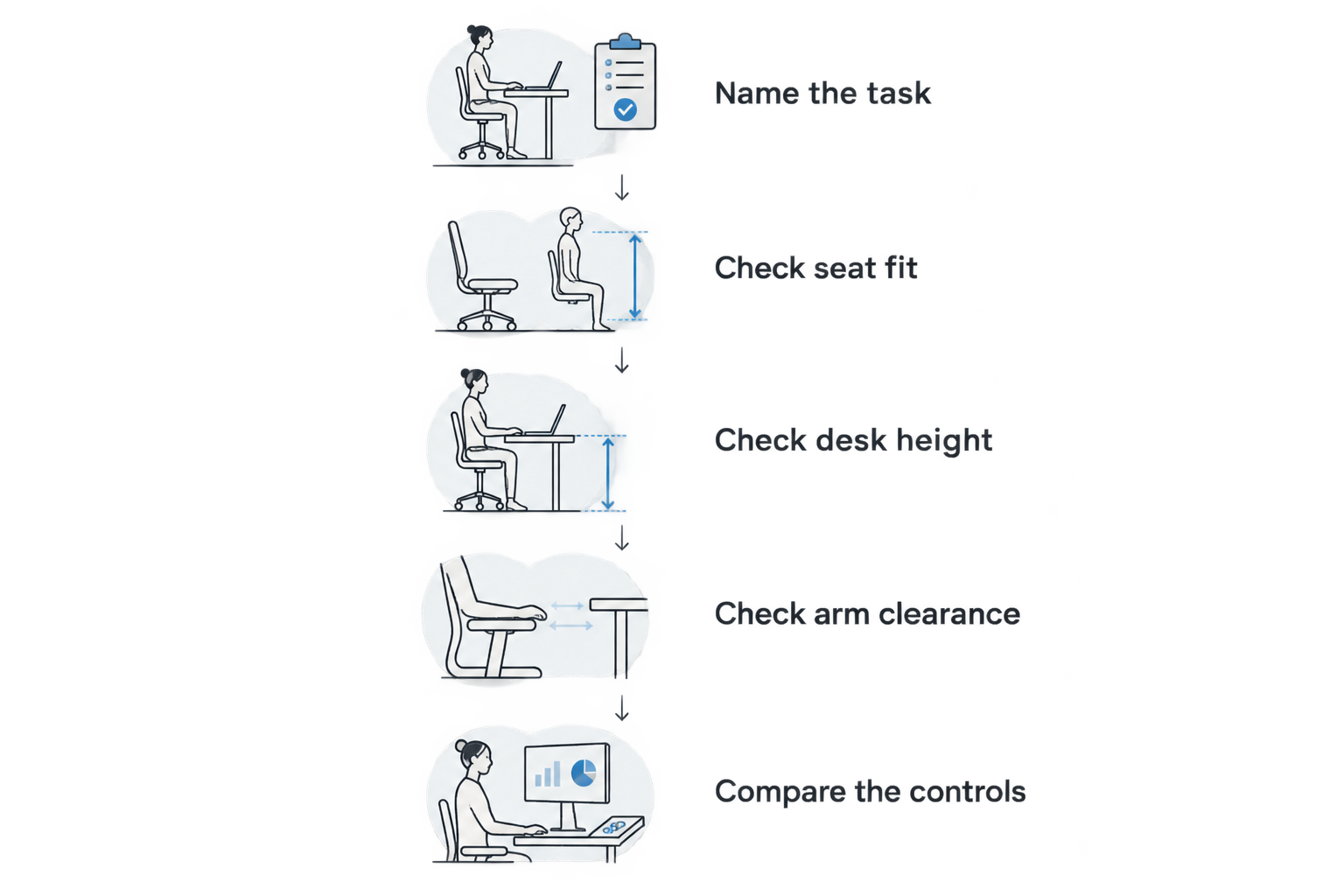
Use a task-based fit check before making your 2026 shortlist. Record your current problem first, then compare the replacement against that problem rather than against advertising language.
- Name the task. Identify whether you are buying for home typing, documentation, patient access, or another specific activity. Separate home-office requirements from clinical requirements.
- Check seat fit. Measure the usable space you need and compare it with documented seat dimensions. Include the seat shape, not just its overall width.
- Check desk height. Compare the chair's documented seat-height range with your actual work surface. Include the space available beneath the desk.
- Check arm clearance. Confirm that supports do not stop you from approaching the keyboard or task. Check clearance while turning and getting up as well.
- Compare the controls. Identify which adjustment resolves your original mismatch. Ask for clarification when a description names a feature without explaining its movement or range.
The order matters because accessories cannot rescue an unsuitable basic fit. A footrest does not shorten an overly deep seat, and adjustable armrests do not change a fixed desk's height. Assess each mismatch separately.
When should you keep your current chair?
Keep your current chair when it supports your main task and the remaining problem comes from the workstation. If your keyboard sits beyond comfortable reach, first examine its placement. If armrests collide with the desk, determine whether an existing adjustment resolves the obstruction.
Replacement makes sense when the chair itself is the limiting component. Examples include a seat shape that does not suit you, a height range that cannot match your work surface, or supports that cannot reach a useful position.
Do not replace a chair simply to obtain a newer ergonomic label in 2026. Replace the limitation, not the label. That rule also prevents buying a clinical chair for a home-office problem it was not selected to solve.
Is a saddle chair better than an office chair for charting?
A saddle chair is not automatically better for charting. Compare the working height, keyboard reach, seat fit, and support arrangement; a conventional office chair remains a relevant option when you want back and arm support for desk-based tasks.
Will an ergonomic chair cure back pain?
An ergonomic chair does not guarantee pain relief or treat a medical condition. Select seating for usable support and task fit, and seek qualified medical advice for persistent or concerning symptoms rather than treating a chair purchase as medical care.
Should your home chair match your clinical chair?
Your home chair should match your home task, not necessarily your clinical chair. A patient-access requirement does not automatically apply to reading reports or completing documentation at a desk.
FAQ
Is an ergonomic home office chair worth it in 2026?
An ergonomic home office chair is worth it in 2026 when its usable adjustments resolve a specific fit or task problem. Paying extra for an ergonomic label without checking dimensions does not establish value.
What's the most important thing to check before buying an ergonomic chair?
Check whether the chair fits both your body and your work surface. Seat dimensions, height range, back support, and arm clearance need to work together during your actual task.
Is a saddle stool better than a regular office chair?
A saddle stool is not universally better than a regular office chair. Choose between them by seat fit, working height, support needs, and task rather than assuming one category suits everyone.
Should a dentist use a surgeon chair in a home office?
A dentist should choose a home-office chair for desk work rather than professional title alone. Consider a surgeon chair only when its verified configuration meets the requirements of that home workstation.
Do more adjustments always make a chair better?
More adjustments do not always make a chair better for you. Each control needs a useful range and must address a real fit or task requirement.
Can an ergonomic chair fix my posture permanently?
An ergonomic chair does not guarantee a permanent posture change or a health outcome. Treat it as one part of your workstation, alongside work placement and changes of position.
What should I compare when shopping at Sithealthier?
Compare Sithealthier ergonomic office chairs and clinical seating by documented dimensions, adjustment ranges, and task-specific supports. Confirm the exact configuration before deciding whether a model fits your workspace.
One last thing
Before replacing your chair, photograph your workstation from the side while you perform your main task. Look for the point where you accommodate the furniture: reaching past an armrest, sitting away from the backrest, or stretching toward the keyboard. Use that observation to write your replacement criteria.
A more specialized chair is not necessarily a better home-office chair. The worthwhile upgrade is the one that removes your specific fit limitation without introducing another.
Leave a comment