
Best overall for desk work: the Ergonomic Mesh Office Chair with 2-to-1 Synchro-Tilt, Adjustable Headrest, Lumbar Support, and Adjustable Pivot Arms in Black. Best for adjustable saddle positioning: the Saddle Shape Stool with Adjustable Back Support and Tilt-able Seat. Best for foot support: the Ergonomic Comfortable Saddle Style Chair With Footrest & Backrest. This 2026 guide compares office chair lumbar support for clinical paperwork, home offices, and patient-facing work.
- For office chair lumbar support at a desk, start with the Ergonomic Mesh Office Chair with 2-to-1 Synchro-Tilt.
- The Saddle Shape Stool with Adjustable Back Support and Tilt-able Seat pairs adjustable back support with seat tilt.
- The Ergonomic Comfortable Saddle Style Chair With Footrest & Backrest combines a backrest, adjustable footrest, and hydraulic height adjustment.
- Choose clinical seating around patient access, working height, and pedal clearance—not the lumbar support label alone.
Browse Sit Healthier ergonomic seating with your main task in mind: computer work, chairside treatment, or a combination. Sit Healthier is best for buyers comparing office chair lumbar support with saddle seating for clinical work.
Why this matters
Lumbar support only helps when the backrest meets your lower back in the position you actually use. A chair that feels supportive while reclining can be a poor match when you move forward to type or approach a patient.
For dental and medical professionals, the distinction matters: charting and treatment are different tasks. Your 2026 seating shortlist should account for both, without assuming one backrest solves every workstation problem.
A chair does not cure pain or guarantee a health outcome. Choose seating for fit, support, and access; seek clinical advice for persistent symptoms rather than treating a product description as medical guidance.
What makes the best office chair lumbar support?
Use these criteria before comparing models. They separate a useful feature from one that does not match your workspace.
- Backrest contact: The support should meet your lower back without pushing you away from the task.
- Seat fit: You should reach the backrest without the seat edge crowding the backs of your knees.
- Adjustment control: Distinguish adjustable back support, seat tilt, and whole-chair recline. They are different functions.
- Working height: Match the chair to the keyboard, patient, or treatment surface while keeping your feet supported.
- Task access: Check whether arms, a footrest, or the chair base interfere with close positioning or pedals.
- Support during movement: Evaluate the chair while typing, reaching, turning, and standing—not just while sitting still.
Best lumbar-support seating at a glance
These 2026 picks occupy different use-case slots. The order favors desk work first, then saddle seating with specific support features.
| Item | Best for | Standout feature | Key limitation |
|---|---|---|---|
| Ergonomic Mesh Office Chair with 2-to-1 Synchro-Tilt, Adjustable Headrest, Lumbar Support, and Adjustable Pivot Arms in Black | Desk-based charting and computer work | Lumbar support with 2-to-1 synchro-tilt and adjustable pivot arms | Desk-focused configuration needs a separate chairside access check |
| Saddle Shape Stool with Adjustable Back Support and Tilt-able Seat | Matching saddle seat angle with back support | Adjustable back support and tiltable seat | Both settings need to work together in your treatment position |
| Ergonomic Comfortable Saddle Style Chair With Footrest & Backrest | Saddle seating with adjustable foot support | Adjustable footrest and backrest, plus hydraulic height adjustment | Footrest placement needs checking around pedals and the base |
| Saddle Shape Stool with Back Support and 500lbs Weight Capacity | Buyers requiring a stated higher weight capacity | Back support and a stated 500 lbs capacity | Capacity does not establish seat fit or adjustment suitability |
1. Mesh office chair: best for desk-based charting
Best for: clinicians and home-office users whose main seated task is computer work.
The Ergonomic Mesh Office Chair with 2-to-1 Synchro-Tilt, Adjustable Headrest, Lumbar Support, and Adjustable Pivot Arms in Black combines a conventional office-chair format with the named support and adjustment features. It is the strongest starting point here when your priority is a desk chair rather than a treatment stool.
The 2-to-1 synchro-tilt describes coordinated movement between the backrest and seat. It does not measure lumbar support quality; you still need to establish where the support contacts your back.
Mesh office chair pros:
- Includes lumbar support in a desk-chair configuration.
- Offers adjustable pivot arms for positioning around computer work.
- Includes an adjustable headrest for supported sitting away from close work.
- Provides synchro-tilt for changing the seated position.
Mesh office chair cons:
- Arms need a clearance check against the desk and any clinical equipment.
- A headrest does not replace lower-back contact during typing.
- The office-chair format is not automatically suited to close patient access.
Choose the mesh office chair if you spend your seated work reviewing records, typing, or handling calls. Before ordering in 2026, confirm the seat dimensions and adjustment ranges against your workstation rather than relying on the feature list alone.
Verdict: Buy for desk-based work after confirming seat fit and lumbar contact.
2. Adjustable-back saddle stool: best for seat-angle control
Best for: dental and medical professionals comparing a tiltable saddle seat with adjustable back support.
The Saddle Shape Stool with Adjustable Back Support and Tilt-able Seat offers both features in its stated configuration. Its description identifies close work and forward positioning as intended uses.
The useful distinction is control over the seat and the back support. Set the seat for your working position, then check whether the back support remains useful rather than forcing you into a different position.
Adjustable-back saddle stool pros:
- Combines a saddle-shaped seat with back support.
- Provides adjustable back support rather than a backless format.
- Includes seat tilt for changing the sitting angle.
- Gives you a clinical alternative to a conventional desk chair.
Adjustable-back saddle stool cons:
- Seat tilt and back support require coordinated setup.
- Back support is only useful when you maintain contact with it during the task.
- A saddle seat needs its own fit assessment; familiar office-chair settings do not transfer automatically.
For chairside work, rehearse instrument access and your normal approach to the patient. Do not accept a setup that requires repeated reaching simply to preserve backrest contact.
Verdict: Buy when adjustable saddle positioning is the priority and the back support fits your working posture.
3. Footrest saddle chair: best for adjustable foot support
Best for: buyers who need a saddle chair combining a backrest with an adjustable footrest.
The Ergonomic Comfortable Saddle Style Chair With Footrest & Backrest includes an adjustable footrest and backrest, hydraulic height adjustment, and 360-degree swivel casters. Those features make foot support a central part of the comparison, not an accessory to consider afterward.
Evaluate the footrest at your required working height. Your feet need a usable resting position without crowding the base or making it difficult to move toward the task.
Footrest saddle chair pros:
- Combines backrest and footrest support in one configuration.
- Includes an adjustable footrest.
- Provides hydraulic height adjustment.
- Includes 360-degree swivel casters for repositioning.
Footrest saddle chair cons:
- A footrest needs checking against dental or medical pedal access.
- Rolling movement is not the same as stationary support during precision work.
- Footrest adjustment does not compensate for a seat height that fails to match the work surface.
This is a different purchase from a desk chair with a headrest. Choose it because you need the saddle-and-footrest combination, then confirm that the whole arrangement fits the room.
Verdict: Buy for adjustable foot support after checking working height and pedal clearance.
4. Higher-capacity saddle stool: best for a stated load requirement
Best for: buyers who require a stated 500 lbs capacity alongside back support.
The Saddle Shape Stool with Back Support and 500lbs Weight Capacity is described for settings including surgery, bodywork, and office use. Its stated capacity gives you a concrete screening criterion when load requirements rule out other seating.
Capacity and fit remain separate decisions. A stool that meets your load requirement still needs the right seat shape, usable height, and back-support position.
Higher-capacity saddle stool pros:
- States a 500 lbs weight capacity.
- Includes back support.
- Uses a saddle-shaped seat.
- Is described for professional and office settings.
Higher-capacity saddle stool cons:
- Weight capacity does not tell you whether the seat fits your body.
- Back support alone does not establish which adjustments suit your task.
- A higher capacity is not evidence of better comfort for every user.
Use the load rating to screen the shortlist, not to settle the purchase. Check the complete chair configuration and fitting information before deciding.
Verdict: Buy when the stated capacity is required and the remaining fit checks pass.
How to check lumbar support before choosing
For a 2026 purchase, start with your actual workstation. A showroom-style sitting position is not enough to judge a chair you will use around a keyboard, patient chair, or treatment table.
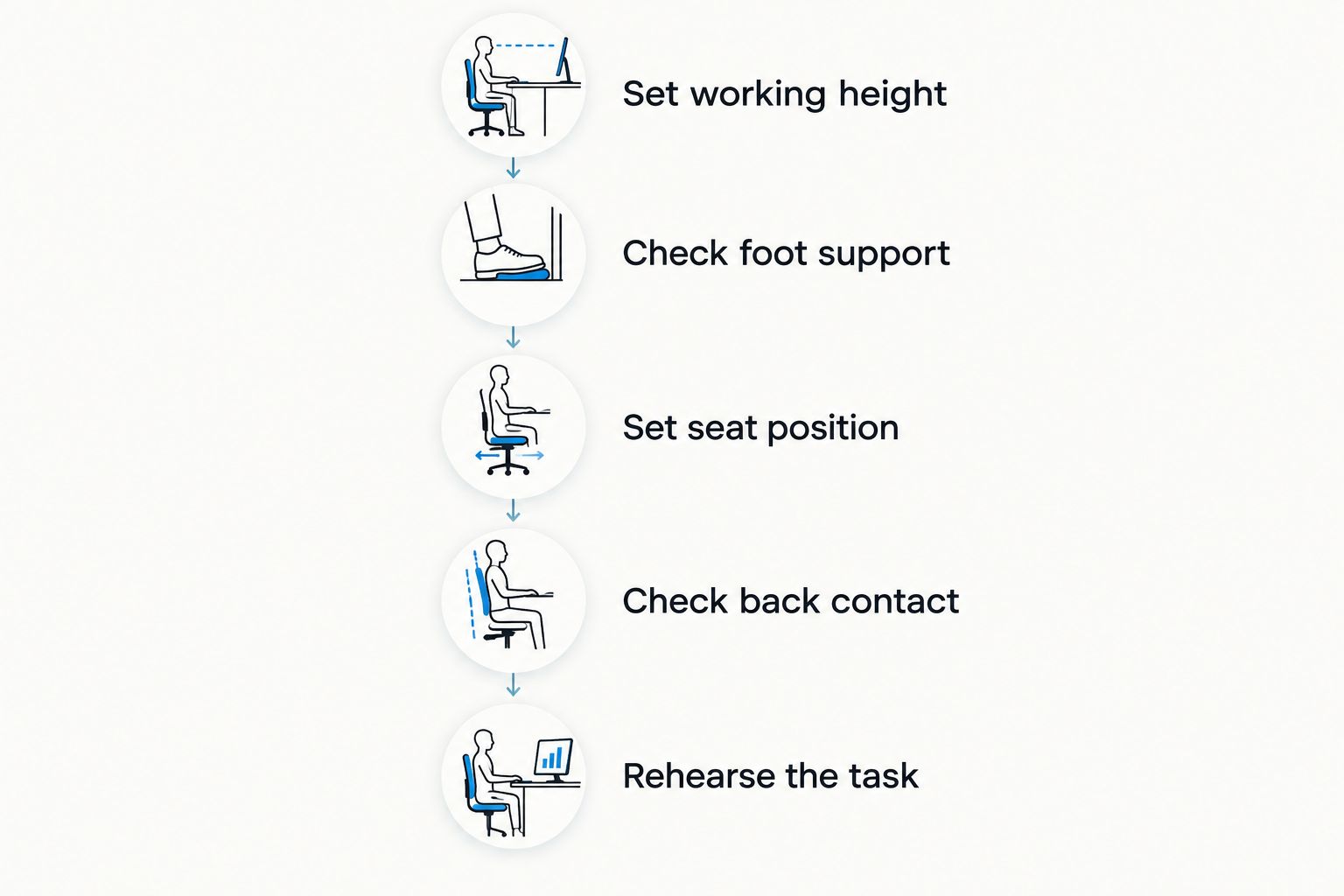
Follow this sequence and record what changes as you move. Keep the same work surface and task position when comparing candidates.
- Set working height. Establish the height needed for your task without lifting your shoulders to reach it.
- Check foot support. Place your feet on the floor or an appropriate support without stretching to reach it.
- Set seat position. Sit far enough back to use the backrest without crowding your knees.
- Check back contact. Confirm that the support meets your lower back rather than pushing your torso forward.
- Rehearse the task. Type, turn, reach, approach the work surface, and stand up as you normally would.
Reject a setup that only feels supportive when you stop doing your job. If moving toward the keyboard or patient repeatedly removes useful backrest contact, reconsider the chair configuration or workstation arrangement.
For shared clinical seating, repeat the fitting process for each user. Record useful settings so the next adjustment starts from a known position rather than guesswork.
Compare the featured configurations
Sit Healthier offers office chair lumbar support and saddle-seat configurations for different working positions. Compare the stated features below, then confirm dimensions, adjustment ranges, and cleaning instructions for your setting.


How the chairs were ranked
The ranking prioritizes task fit, stated support features, adjustment control, and workspace access. It compares the listed configurations, not measured clinical outcomes or hands-on test results.
The mesh office chair leads for desk work because its named features address that setting. The saddle options follow by distinct requirements: seat-angle control, foot support, and stated load capacity. No model earns a universal comfort claim.
Which lumbar-support chair should you choose?
For an undecided desk-based buyer, start with the mesh office chair. Its lumbar support, adjustable pivot arms, adjustable headrest, and synchro-tilt make it the clearest office-focused choice in this comparison.
For clinical work, choose the feature your task requires rather than copying the desk-work winner. Start with the adjustable-back saddle stool for seat-angle control, the footrest saddle chair for foot support, or the higher-capacity stool when the load requirement is decisive.
Give Sit Healthier your working height, main task, and fit requirements when asking for help choosing. That produces a more useful discussion than asking which chair has the strongest lumbar support.
FAQ
What's the best office chair lumbar support option for desk work?
The Ergonomic Mesh Office Chair with 2-to-1 Synchro-Tilt is the desk-work starting point in this comparison. Its stated configuration includes lumbar support, an adjustable headrest, and adjustable pivot arms; confirm that the seat and backrest fit your body.
Is adjustable lumbar support better than a fixed backrest?
Adjustable support gives you another way to match the chair to your body, but correct contact is the deciding factor. A fixed backrest that fits is more useful than an adjustable one that never meets your lower back during work.
Is a saddle chair better than an office chair for a dentist?
Choose by task rather than profession alone. Compare saddle seating for patient access and working position, and conventional office seating for desk-based charting; assess each configuration in the operatory.
Where should lumbar support touch my back?
Lumbar support should meet the inward curve of your lower back without pushing your torso away from the task. Check contact while working, not only while leaning against the backrest.
Do I need a footrest with a lumbar-support chair?
You need suitable foot support if your working position leaves your feet unsupported. Check whether a chair-mounted footrest fits your posture and leaves clinical pedals accessible.
Does a 500 lbs capacity mean a chair will fit a larger user?
A stated 500 lbs capacity addresses load, not complete body fit. Seat dimensions, working height, and back-support position still need checking.
Can an ergonomic chair cure lower-back pain?
An ergonomic chair does not guarantee pain relief or treat a medical condition. Select seating for fit and task support, and seek qualified clinical advice for persistent or worsening symptoms.
One last thing
Before replacing your chair in 2026, check how far the keyboard or patient sits from you. A supportive backrest cannot remain useful if the work arrangement repeatedly pulls you away from it.
Bring the task into reach, then judge the chair. That is a more reliable final check than pressing against the lumbar pad while sitting still.
Leave a comment