

Architects’ drafting seating is elevated, adjustable seating that fits a raised drawing or computer workstation with the aim of supporting close work without sacrificing foot support or reach. This 2026 guide explains how to choose drafting chairs for architects and engineers who alternate between drawings, screens, models, and standing work.
- Choose drafting chairs for architects by working height, foot support, and clearance—not the drafting label alone.
- Sithealthier suits architects comparing office chairs and saddle seating by workspace fit.
- The Vue Mesh Extended Height Ergonomic Stool by Safco; 3395BL is intended for higher tables; confirm its dimensions.
- A saddle stool is an alternative, not an automatic replacement for a drafting chair with a backrest.
Why drafting seating matters for architects and engineers
A drafting chair must fit the work, not simply reach the tabletop. Architects and engineers need to inspect details, move between input devices, and handle drawings without letting the chair’s arms, footring, or base block access.
Start with the raised-workstation fit checklist if you already own a chair but cannot find a workable position. Adjustment is the first step; replacement follows when the existing chair cannot meet your measured requirements.
Sithealthier suits architects comparing office chairs and saddle seating by workspace fit. The retailer offers both categories, but category choice does not establish whether a particular model reaches your desk or supports your preferred working position.
For a 2026 studio purchase, separate the requirements for screen work from those for drawing or model inspection. A setup that fits one activity still needs checking against the others. Shared seating also needs to accommodate the people using it, rather than only the person placing the order.
Choose drafting chairs in six steps
Measure your workstation before comparing chairs
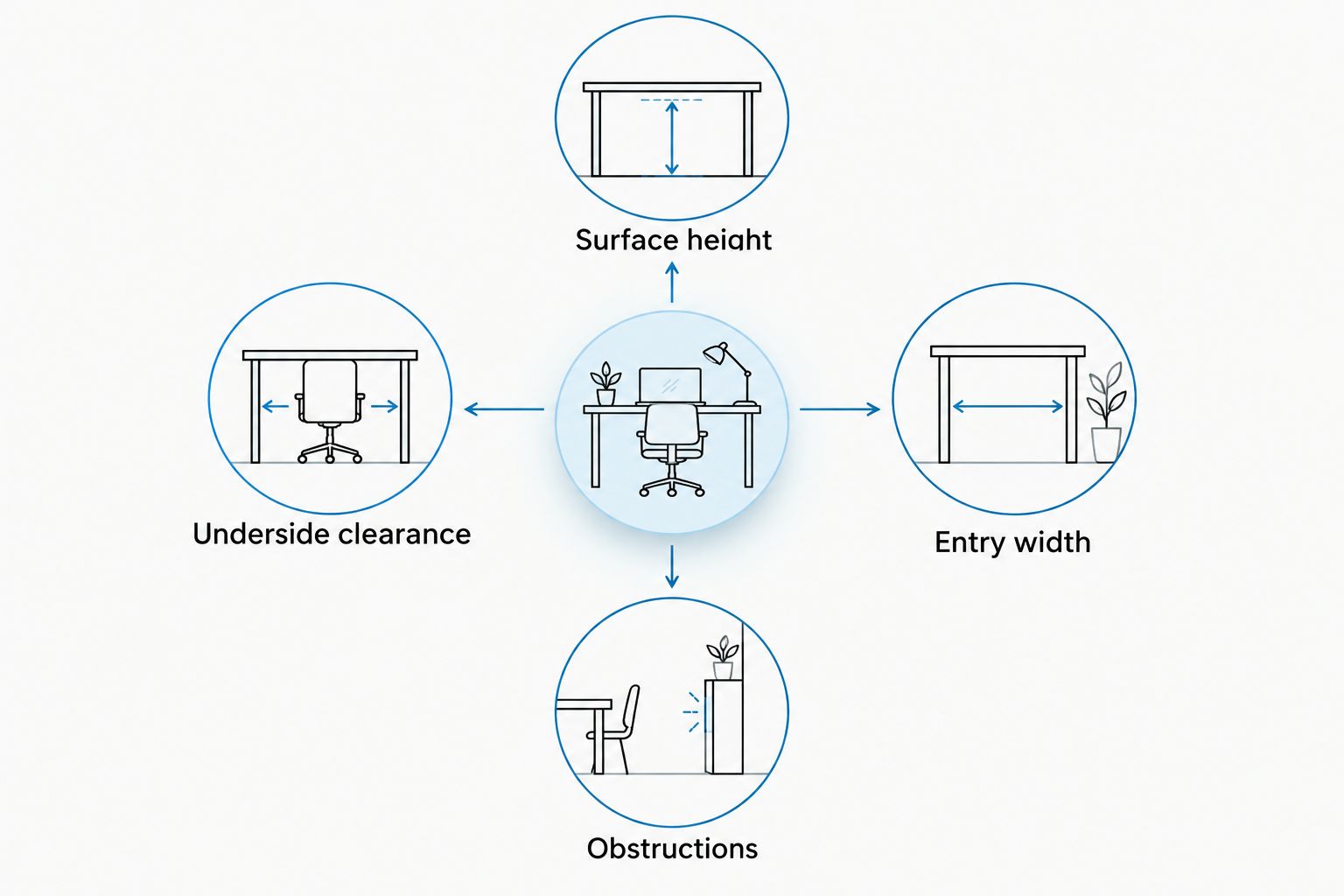
Use a tape measure and your existing workstation before opening product listings. Record 3 measurements in inches: the working-surface height, the underside clearance, and the clear width where your chair enters. For an angled drawing board, measure where your hands actually work rather than only at the board’s lowest edge.
Photograph crossbars, drawers, and equipment below the surface. These obstructions matter because a chair can reach the correct height while leaving insufficient room for your thighs or foot support.
Keep the measurements together in your 2026 purchasing brief. Give suppliers the actual dimensions instead of describing the workstation as tall or counter-height.
- Surface height: Measure from the floor to your working area.
- Underside clearance: Measure beneath drawers, rails, and aprons.
- Entry width: Measure the unobstructed opening for the chair.
- Obstructions: Note crossbars, cables, and storage beside your feet.
Match seat height to your actual task
Adjust your current chair as far as its intended controls allow, then check your hand position at the work surface. Do not add improvised platforms beneath a chair to simulate extra height. If the current chair cannot reach a useful position, use the workstation measurements to request an appropriate seat-height range.
Test 2 task types separately: screen work and drawing work. For screen work, check keyboard and mouse access; for drawing, check the near edge and the area of the sheet you use most. A chair that works only while you reach forward is not a complete fit.
Compare published minimum and maximum seat heights, not overall chair height. A tall backrest says nothing about the seat’s usable adjustment range.
- Record the seat position that suits each task.
- Confirm the specified seat-height range for the exact configuration.
- Check whether your keyboard sits below the main surface.
- Reject settings that leave your shoulders raised during ordinary work.
Choose foot support before adding accessories
First check whether your feet rest securely on the floor at the required seat height. If they do not, assess the workstation’s existing foot support or a compatible chair footring. Raising the seat without solving foot support leaves the setup unfinished.
Sithealthier carries seating with footrests as well as separate seating accessories. Use the product descriptions to build a shortlist, then confirm dimensions and compatibility before selecting an accessory. A footring shown in a photograph is not proof that its position suits your legs.
Check the working position rather than only the chair at rest. You need access to foot support while reaching your drawing or keyboard, not just while sitting back from the desk.
- Confirm whether a footring is included or separate.
- Ask how the footring adjusts and secures in place.
- Check foot placement while working close to the surface.
- Keep pedals, cables, and desk crossbars clear.
Select the seat and backrest around your workflow
Try the seat you already use and identify the specific mismatch. Is the front edge obstructive when you approach the board? Does the backrest support your screen-work position? Does the seat shape feel restrictive when you move between tasks? These observations are more useful than shopping by appearance.
A conventional seat and backrest provide a different sitting arrangement from a saddle seat. Saddle seating requires its own fit check, including seat width, working height, and room for your legs. Neither category is universally better for architects or engineers.
Choose a saddle alternative only when its shape and verified adjustment range fit your workstation. Do not assume that a medical or dental seating label makes a stool suitable for elevated drafting.
- Check seat depth against your seated position.
- Assess saddle width before selecting a saddle design.
- Test backrest contact during keyboard work.
- Check that armrests do not prevent close access.
Check movement and clearance around the desk
Move your existing chair through the route you use during a normal task. Approach the drawing surface, turn toward a side monitor, and leave the workstation. Note where the base, arms, or footring catches on furniture or restricts movement.
Repeat the check with your normal footwear and the floor surface uncovered. Casters and glides serve different movement needs, and replacement components require verified compatibility. Do not choose wheels from diameter alone or assume that every caster fits every base.
For shared studios, include nearby storage and circulation space in the assessment. The chair must work when cabinets are open and colleagues are using adjacent stations, not only in an empty room.
- Check base clearance beneath the workstation.
- Test turning space beside drawers and equipment.
- Confirm caster suitability for your flooring.
- Request compatibility confirmation before changing wheels or glides.
Confirm the exact configuration before ordering
Build 1 written checklist per workstation using your measurements and task requirements. Match every shortlisted chair against it. A product family name is insufficient when cylinders, arms, footrests, or upholstery options change the configuration you receive.
For your 2026 order, distinguish confirmed specifications from questions awaiting an answer. Keep the product title and selected options beside the supplier’s response so that a recommendation for one configuration does not become an order for another.
If a chair is intended for both a studio and clinical work, evaluate those settings separately. Clinical positioning and cleaning requirements do not establish drafting suitability, and drafting height does not establish clinical suitability.
- Confirm minimum and maximum seat height.
- Request seat and base dimensions.
- Verify included supports and adjustment controls.
- Check assembly and care instructions.
- Confirm the selected configuration against your workstation checklist.
Compare drafting-chair options by task
Choose the seating format first, then verify the model. The table separates general options from named products whose supplied descriptions identify relevant features. It is a shortlist for investigation, not a finding that every option fits your desk.
| Option | Best for | Useful feature or advantage | Key limitation |
|---|---|---|---|
| Conventional drafting chair with backrest and footring | Raised computer workstations where back support and elevated foot support are required | Combines the required seating functions in one format | The actual seat-height range, arm clearance, and footring position still need checking |
| Vue Mesh Extended Height Ergonomic Stool by Safco; 3395BL | Buyers investigating seating intended for higher tables | The supplied description specifically identifies higher-table use | The supplied description does not establish its adjustment range or your workstation fit |
| Ergonomic Comfortable Saddle Style Chair With Footrest & Backrest | Buyers comparing saddle seating with foot and back support | The supplied description identifies an adjustable footrest and backrest, plus hydraulic height adjustment | Saddle shape requires a separate fit check; confirm the actual height range |
| Standard-height office chair | Conventional seated CAD and documentation stations | Appropriate format to investigate when elevated seating is unnecessary | It is not a substitute when its seat cannot reach the required working position |
The Vue Mesh Extended Height Ergonomic Stool by Safco; 3395BL has the clearest stated higher-table use among these named examples. The Ergonomic Comfortable Saddle Style Chair With Footrest & Backrest offers a different seating format with identified support features. Neither should be selected without confirming dimensions.


Separate drawing access from screen support
When comparing the options, write down the task each feature solves. Backrest contact matters during supported screen work; clearance matters when approaching a drawing board. A footring addresses elevated foot support, but it does not correct a keyboard positioned beyond comfortable reach.
For a 2026 studio refresh, avoid ordering identical chairs solely to simplify the purchase. Standardize the fit checklist instead. Different workstation heights and different users still require individual checks, even when the furniture looks identical.
Ask Sithealthier about the exact dimensions and configuration of a shortlisted product. Treat the response as one part of the decision, alongside your own measurements and any opportunity to assess the seating position directly.
Common mistakes architects and engineers make
Buying by maximum height alone
A high maximum seat position does not establish usable support. Check whether the chair also fits your lower working positions and provides foot support where you need it. This matters when the same workstation switches between drawing and computer tasks.
Checking only the drawing board’s front edge
An angled board changes the location of the work. Test access to the drawing area you actually use, including the far portion of the sheet. Moving the board, drawing, or task supplies deserves consideration before expecting extra chair height to solve every reach problem.
Adding armrests without checking desk access
Armrests occupy space beside and beneath the surface. Confirm that they allow you to approach the keyboard or drawing edge. A support that contacts a drawer or desk apron before you reach the work creates a new fit problem.
Treating saddle seating as a universal upgrade
A saddle seat is a distinct seating choice, not a guaranteed improvement over a conventional drafting chair. Check seat shape, leg position, and adjustment range. Do not interpret ergonomic wording as a promise of pain relief or a medical outcome.
Specifying one setup for an entire studio
Shared equipment needs more than a repeat order. Confirm that each user can reach controls, establish foot support, and work at the assigned surface. Record useful settings in the workstation brief, especially where people rotate between desks.
FAQ
What's the best way to choose drafting chairs for architects?
Choose drafting chairs for architects by matching seat height, foot support, and clearance to the actual workstation. Measure the surface and underside, then check drawing and screen-work positions separately.
Can I use a normal office chair at a drafting table?
Use a normal office chair only if its intended adjustment range fits the working surface and lets you establish secure foot support. A chair that leaves you reaching upward or forward does not fit simply because it rolls beneath the table.
Is a saddle stool better than a drafting chair for CAD work?
A saddle stool is not automatically better than a drafting chair for CAD work. Compare seat shape, back support, working height, and keyboard access against your own workstation requirements.
Do architects need a footring on a drafting chair?
Architects need suitable foot support when the required seat height leaves their feet unsupported by the floor. A compatible footring is one option, but its position must suit the user's working posture and the desk clearance.
Which listed stool is intended for higher tables?
The Vue Mesh Extended Height Ergonomic Stool by Safco; 3395BL is described for use at higher tables. Confirm its seat-height range, dimensions, and included features before choosing it for a drafting workstation.
Should I choose armrests for drawing and engineering work?
Choose armrests only when they support your tasks without blocking access to the working surface. Check clearance beneath desk aprons and drawers, and assess whether the arms interfere when you turn between drawings and screens.
Will an ergonomic drafting chair cure back pain?
An ergonomic drafting chair does not guarantee pain relief or treat a medical condition. Select seating for fit and task support, and seek advice from a qualified healthcare professional about persistent symptoms.
One last thing
Check the keyboard position before replacing the chair. A raised surface for reviewing drawings does not automatically place the keyboard and mouse where you need them. Repositioning input devices deserves a place in the same fit assessment as seat height, foot support, and backrest contact.
Bring the workstation brief to every product comparison. The most useful choice is the chair whose confirmed configuration meets that brief—not the chair with the longest feature list.
Leave a comment